In computing, sort is a standard command line program of Unix and Unix-like operating systems, that prints the lines of its input or concatenation of all files listed in its argument list in sorted order. Sorting is done based on one or more sort keys extracted from each line of input. By default, the entire input is taken as sort key. Blank space is the default field separator. The command supports a number of command-line options that can vary by implementation. For instance the "-r" flag will reverse the sort order.
History
A sort command that invokes a general sort facility was first implemented within Multics. Later, it appeared in Version 1 Unix. This version was originally written by Ken Thompson at AT&T Bell Laboratories. By Version 4 Thompson had modified it to use pipes, but sort retained an option to name the output file because it was used to sort a file in place. In Version 5, Thompson invented "-" to represent standard input.
The version of sort bundled in GNU coreutils was written by Mike Haertel and Paul Eggert. This implementation employs the merge sort algorithm.
Similar commands are available on many other operating systems, for example a sort command is part of ASCII's MSX-DOS2 Tools for MSX-DOS version 2.
The sort command has also been ported to the IBM i operating system.
Syntax
sort [OPTION]... [FILE]...
With no FILE, or when FILE is -, the command reads from standard input.
Parameters
Examples
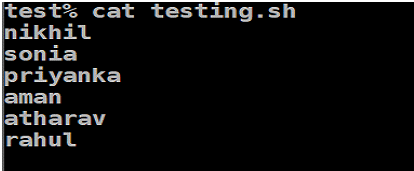
Sort a file in alphabetical order
Sort by number
The -n option makes the program sort according to numerical value. The du command produces output that starts with a number, the file size, so its output can be piped to sort to produce a list of files sorted by (ascending) file size:
The find command with the ls option prints file sizes in the 7th field, so a list of the LaTeX files sorted by file size is produced by:
Columns or fields
Use the -k option to sort on a certain column. For example, use "-k 2" to sort on the second column. In old versions of sort, the 1 option made the program sort on the second column of data ( 2 for the third, etc.). This usage is deprecated.
Sort on multiple fields
The -k m,n option lets you sort on a key that is potentially composed of multiple fields (start at column m, end at column n):
Here the first sort is done using column 2. -k2,2n specifies sorting on the key starting and ending with column 2, and sorting numerically. If -k2 is used instead, the sort key would begin at column 2 and extend to the end of the line, spanning all the fields in between. -k1,1 dictates breaking ties using the value in column 1, sorting alphabetically by default. Note that bob, and chad have the same quota and are sorted alphabetically in the final output.
Sorting a pipe delimited file
Sorting a tab delimited file
Sorting a file with tab separated values requires a tab character to be specified as the column delimiter. This illustration uses the shell's dollar-quote notation to specify the tab as a C escape sequence.
Sort in reverse
The -r option just reverses the order of the sort:
Sort in random
The GNU implementation has a -R --random-sort option based on hashing; this is not a full random shuffle because it will sort identical lines together. A true random sort is provided by the Unix utility shuf.
Sort by version
The GNU implementation has a -V --version-sort option which is a natural sort of (version) numbers within text. Two text strings that are to be compared are split into blocks of letters and blocks of digits. Blocks of letters are compared alpha-numerically, and blocks of digits are compared numerically (i.e., skipping leading zeros, more digits means larger, otherwise the leftmost digits that differ determine the result). Blocks are compared left-to-right and the first non-equal block in that loop decides which text is larger. This happens to work for IP addresses, Debian package version strings and similar tasks where numbers of variable length are embedded in strings.
See also
- Collation
- List of Unix commands
- uniq
- shuf
References
Further reading
- Shotts (Jr), William E. (2012). The Linux Command Line: A Complete Introduction. No Starch Press. ISBN 978-1593273897.
- McElhearn, Kirk (2006). The Mac OS X Command Line: Unix Under the Hood. John Wiley & Sons. ISBN 978-0470113851.
External links
- Original Sort manpage The original BSD Unix program's manpage
sort(1)– Linux User Manual – User Commandssort(1)– Plan 9 Programmer's Manual, Volume 1sort(1)– Inferno General commands Manual- Further details about sort at Softpanorama
![The “sort” Command in Linux [16 Practical Examples]](https://linuxsimply.com/wp-content/uploads/2023/01/sort-command-in-linux-8-767x479.png)


![The “sort” Command in Linux [16 Practical Examples]](https://linuxsimply.com/wp-content/uploads/2023/01/sort-command-in-linux-21-2048x356.png)